Class 3: Peer Review / WordPress Tutorial

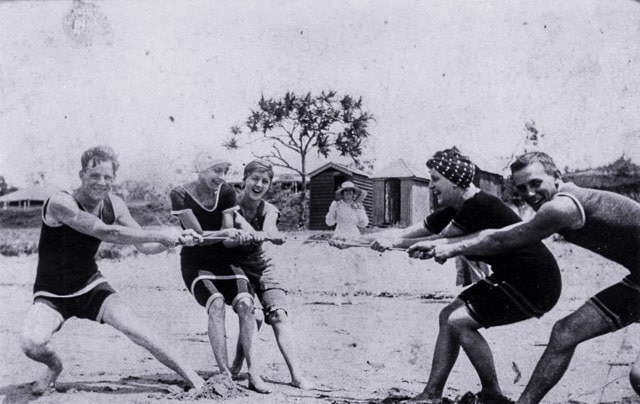
Beach tug of war at Southport, 1917

Peer Review

Last week’s class introduced key elements of lesson design and assigned Lesson Study I.  This week we are going to conduct two peer reviews of each lesson study, before it gets “turned in.” This models the student centered approach – with your peers sharing their higher-ordered review of your work – analyzing and evaluating it’s content. Following their feedback, you get to reflect on your work before turning it in.

We’ll manage the lesson study this way:

  1. You should bring in 3 copies of your 1st draft. (two to share and to one keep their notes on).
  2. You will be randomly put in the first peer review paring
  3. Meet and greet: exchange a quick 1 min intro to your lesson study – grade, subject, scope (one class lesson or a larger unit?)
  4. Exchange written drafts and study for 3 mins. Mark up your copy if you see typos or want to add suggestions. Develop 3 questions  you will ask for clarification.
  5. Student A questions B. Student B responds 3 mins
  6. Discussion / Brainstorming / B takes notes to captures modifications 3 mins
  7. Reverse roles with Student A’s work under review
  8. This should take us about 20 minutes to review each other’s work. You will then be assigned to another student to repeat the peer review process

After everyone has completed two reviews you will then have about 20-30 minutes to make revisions to you lesson study. (A good time to talk to the instructor as well). You should also write a personal reflection on what they learned in developing their first lesson study and participating in the peer review process

Submitting lesson study as blog post: See results here

Students will turn in their revised Lesson Study I assignment as a post on this blog by 10 PM Sept 10th. It should include their lesson study as well as personal reflection. Each post should also have a historic photograph (public domain with citation) that matches the theme or subject of their lesson study.

I’ve prepared some brief WordPress video tutorials. You can find them at this YouTube playlist / WordPress tutorials for using our class blog These tutorials were made with a free Chrome Plug in called SnagIt.

Assignments for class 4 on historical thinking
I’ve used the TEDEd flipped lesson feature to curate a existing YouTube and turn it into a lesson to support next week’s class on historical thinking: Who is the historian in your classroom? Another way to flip a class.

Also do one online reading Thinking Like a Historian By Sam Wineburg


Image source:

Beach tug of war at Southport, 1917
State Library of Queensland link
Class 2: Designing Lessons / Social Media Audits

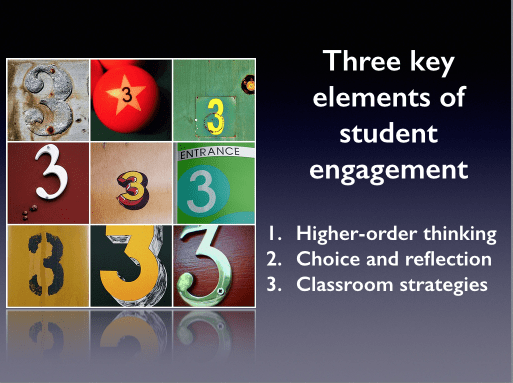
Three key elements of student engagement
This week we consider two very different themes – social media and instructional design. The class begins by addressing key elements of lesson design :

  1. Higher-order thinking
  2. Student choice and reflection
  3. Effective classroom strategies

This  portion of the class lesson includes three major elements:

  • Practical examples of Bloom’s taxonomy in the form of sample exercises and questions. They are used to anchor a conversation on Bloom in action.
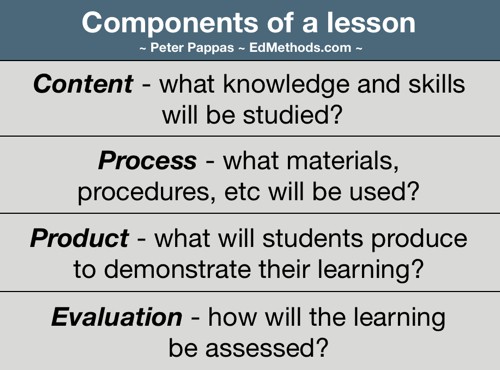
  • How student choice can impact key lesson elements – content, process, product, evaluation.
  • Demonstrate a student-centered approach to a teacher presentation as a way to foster reflection (instead of listening to a straight lecture on the subject)

The lesson is driven by a Keynote presentation. Handout (42MB pdf)  We will use an audience response system to gather student input. The lesson includes multiple activities that illustrate the content. Student will be led through discussing their reactions to the activities to connect them to the content. This lesson will serve as a kick off to their first assignment to write and share a Lesson Study.

key lesson components

In the second half of the class we’ll meet in small groups to share our personal social media audits. We’ll be focusing on rolling out our new Google+ Community and learning how to use some it’s features. It’s a private group and will serve as an extension of classroom discussion through posts, comments, and Hangouts.

Assigned Readings for Class 3: None

Written assignment for Class 3:

Lesson Study I is due next week.

The goal of this assignment is two-fold. First to offer supportive feedback on your lesson development through a peer review process. Second to offer some “lenses to look through” that help you easily see the essentials of a lesson. It is not a substitute for the School of Education lesson plan format. Think of it as a pre-lesson plan planning guide. This is not some exercise for the benefit of your instructor. This should be a process that works for you. So feel free to modify to meet your particulars. Use a scale that works for you – focus on just a small segment of a larger unit, or look at the entire unit. Don’t like Bloom? Use another schema to discuss the kinds of thinking that your students will need to successfully complete the assignment. Assignment here. (383 KB pdf) Sample lesson study (378 KB pdf)

See results of this assignment in the first student posts


Class 1: Designing a Teacher

human skeleton2
Our new semester kicks off on August 25th.

Class 1 Overview

As an ice breaker, I’ll give students an activity to design a great history teacher-  a variation of “Tool 13: Brainstorm, Group, Label” from my Literacy Strategies Tool Kit (free PDF)

  • Ask them to brainstorm all the words or phrases they can associate with “a great history teacher.”
  • Give them Post-Its and asked them to write one associated word or phrase on each sheet.
  • Put them in groups and ask them to share their Post-its and thinking. Then design an illustration that captured their collective thinking. And be prepared to share that with the class.
  • Working in fours synthesize their individual brainstorming into a collective vision on large paper, then take turns sharing and responding to questions.

I’m giving my students a copy of my 1971 student teaching evaluation (2 page pdf) Quite a relic – I’m surprised I still have it. We’ll examine it as an historic document with a critical eye for answering a number of questions: Who created it and why? Historic context? Point-of-view? What could we learn from it? What other sources might we need to collaborate?

I’ll spend some time introducing the course. Here’s a copy of this semester’s course calendar. (91 kb pdf)

Finally, we’ll log into LearningCatalytics and I’ll give them a series of questions to help me get to know them better. On the tech side I’m interested in their devices, digital skills, social media profile, and some of the programs they’re comfortable using. From an instructional perspective I’ll ask them to describe their goals for the course.

Assigned Readings for Class 2:

  1. Reading: “How to Motivate Students: Researched-Based Strategies” Link
  2. Reading: “A Taxonomy of Reflection: Critical Thinking For Students, Teachers, Principals” Link

Written assignment for Class 2:

Develop an overview of your “digital profile.” It can take any form you choose (it doesn’t even have to be digital). But it  should be something you can share with a classmate that makes sense without you having to explain it. If you look at “Reading 1” above, you’ll see why I have intentionally left the process and product open-ended.  

This profile will become your baseline analysis that you will return to later in the course as you reflect on your accomplishments meeting Course Goal #3: Develop skills for reflection, growth and professional networking. I will be giving you a similar assignment at the end of the course so that you will be able to measure your growth in this area.

Bottom line: Be sure it is useful to you.

Here’s a few prompts to get you started. No need to answer all the questions – they’re just idea starters:

  • Suppose you are interviewing for job – what impression would an employer form about you.
  • What’s your brand?
  • What links, if any, appear if you googled your name? (in quotes).
  • What social networks are you a member of? Are you a member of specific user groups? (Example, Google+ communities)
  • How do you represent yourself in these networks?
  • If you use social media networks, how do you use them? Do you share original content online? Do you curate and share content online with others?
  • If any of your social media provide metrics for number of connections (example, Twitter following, followers) record the number so you can use the metric later. (Please note: I’m not implying more is better.)


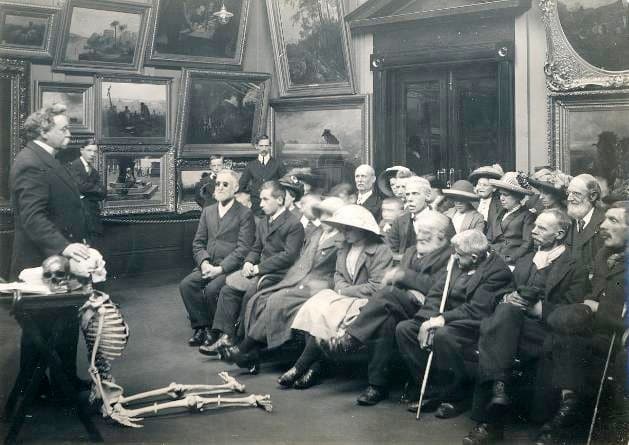
Image Credit : Tyne & Wear Archives & Museums “Human Skeleton”
Blind adults are listening to a short lecture at Sunderland Museum before examining a human skeleton.1913
“To them, their fingers are eyes”
From 1913, John Alfred Charlton Deas, a former curator at Sunderland Museum, organised several handling sessions for the blind, first offering an invitation to the children from the Sunderland Council Blind School, to handle a few of the collections at Sunderland Museum, which was ‘eagerly accepted’.
Ref: TWCMS:K13804(2)