Nexus Tablets 1 – 1 Classroom

Google Nexus Tablet

Prompt:  Assume you have your first full time teaching job and the principal tells you that you’ve been selected to pilot the  “1 to 1 Project.”  What are your thoughts about the opportunities and challenges that  presents?

I’m glad the Nexus tablets our students have are not this large. They would be even harder to type on and even more of a distraction … My CT chose the Nexus tablets rather than iPad’s because he could get more of them. With the Nexus, he was able to complete a class set. Although the ones we have are smaller, there are still significant issues with using them. As of now, I am torn on the merits of a 1 – 1 classroom through the Google Nexus Tablet design.

First and foremost, the tablets we have are not equipped with keyboards. My CT hoped that students – being so apt in texting – would be able to type quickly on the screens. This was not the case. There are consistent technical issues with typing, copying and pasting, along with the other issues such as WIFI connectivity and more. Rather than moving more quickly with technology, it would be more simple for students to write things by hand. If not, I often send them to the library where they can type more quickly.

There are good things about this format. Google Classroom is the largest by far. The ability to push assignments and handouts to students not only saves paper, it helps both the student and teacher alike by keeping their lives more organized. Students complete these assignments online and turn them in with the click of a button. This is an incredible bonus for everyone.

However, I am conflicted about the efficacy of this method. Perhaps different technology would make the situation better. If students had the ability to type rather than just using their thumbs, they would complete work more quickly. Even so, using these tablets in class has become a double edged sword. It deserves more consideration before full implementation.

The 1:1 classroom good, bad or ugly?

The monkey selfie

The monkey selfie

Prompt:  Assume you have your first full time teaching job and the principal tells you that you’ve been selected to pilot the  “1 to 1 Project.”  What are your thoughts about the opportunities and challenges that  presents?

The good:

Integrating technology into the curriculum is pivotal in the process of making the classroom an extension of the real world. Students need to know how to use technology for success in social, professional and personal situations. To remove technology from the classroom would be detrimental to the validity of the class as it is no longer applicable or relatable to student’s everyday life. Additionally, students will be utilizing technology to further their education at home and as they go on to study at the university level, teaching them how to use it and how to use it successfully.

The bad:

In this era students spend most of their life staring at a screen between television, cell phones, computers, tablets, ipads, ibooks and video games. Spending too much time on the screen has proven harmful in some studies. One such study suggests that too much screen time can cause brain damage while others have shown a relationship between excessive screen time and an inability to read other people’s emotions. (NPR) As an educator I have to ask myself if it is wise to add to their already excessive screen time.

The ugly:

While I believe that classroom management should never prevent an educator from teaching important content, providing students with their own electronic device to use during class can be a nightmare. Even the best students can get sucked into the never ending fun that is animal memes and celebrity gossip. Students can access inappropriate content, illegally download movies (including classic western films) in your classroom and on your watch. Ipads and laptops with cameras provide the perfect opportunity for class selfies. While these may seem like harmless distractions that can be handled by consistent classroom management, it can prevent students from getting to the heart of the lesson that could be delivered in a more productive manner.

Digitize Me!

Created by the author from Haiku Deck -- an internet application that can be used in a 1 to 1 classroom.
Created by the author from Haiku Deck — an internet application that can be used in a 1 to 1 classroom.

Prompt:  Assume you have your first full time teaching job and the principal tells you that you’ve been selected to pilot the  “1 to 1 Project.”  What are your thoughts about the opportunities and challenges that  presents?

Technology is not only a fact of life for most Americans these days but rather an integral part of their everyday lives. This is especially true for today’s teens who often interact with multiple forms of technology on a regular basis. Enter “1 to 1 classrooms,” an amazing opportunity for educators to utilize technology in order to create an engaging and meaningful learning environment for their students. Personally, I can envision countless ways to take advantage of all that 1 to 1 classroom activities have to offer—not least of which being the possibility of encourage students’ willingness and drive to learn.

I am very interested in the idea of a “flipped” classroom, especially in the context of a social studies class. I feel this structure would lend itself very well to the subject for example, students could watch a pre-recorded video of a lecture and then come prepared to class to discuss and delve deeper into related primary sources. My concern with this set-up however would be in terms of access. I’ve worked in a number of high poverty schools and I know that this strategy would not have worked and indeed would have been a hardship for my students. The ideas, opportunities, and apps are all out there doing amazing things, I just think that we as educators need to always think very critically about how to implement 1 to 1 strategies to best serve our students’ unique needs and circumstances.

With Great Power Comes Great Responsibility: Harnessing Classroom Technology

Prompt:  Assume you have your first full time teaching job and the principal tells you that you’ve been selected to pilot the  “1 to 1 Project.”  What are your thoughts about the opportunities and challenges that  presents?

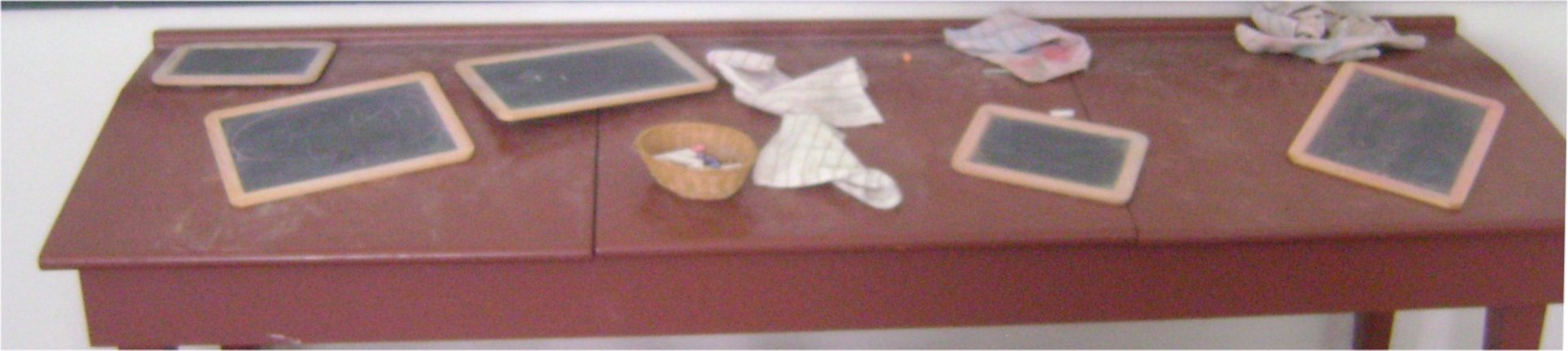
Classroom tech of yesteryear: slate boards and chalk – typically used in 19th-century American log cabin schools

Advances in technology are fundamentally transforming the way students engage with social studies content. The widespread availability of primary documents and inexpensive applications give teachers unprecedented flexibility in creating opportunities for learning. Of course, these opportunities come with caveats. The boundlessness of the internet  requires that teachers balance student freedom with thoughtful curation of content and activities.

The dimension of the one-to-one classroom that is most exciting to me is the potential for student-directed inquiry. At its core, teaching social studies is about teaching students to investigate social phenomena and think critically. Ideally, a social studies lesson requires that student find, interpret, and synthesize data to reach conclusions. Consequently, I feel that one of my chief obligations is to prepare students to utilize the tools and resources that will be available to them throughout their lives. The one-to-one classroom gives me the ability to do exactly this. Instead of providing students with a a single question and a section from a textbook, individual students can participate in the process of finding and supporting answers on their own. Teachers can offer broad prompts and guidance regarding the evaluation of sources, but students ultimately use these activities to hone their own research and critical thinking skills. Further, the kind of student learning data potentially produced in the context of a one-to-one classroom is very rich and can inform more responsive and better-tailored teaching.

The one-to-one classroom brings with it two major challenges. First, teachers must ensure that all students in the class are equipped with the requisite tech skills to participate fully in class. In some ways, more technology makes certain kinds of scaffolding and support easier. For example, software can help ensure that linguistic or sensory differences do not limit students’ ability to participate in lessons. Conversely, students will need to be able to use search engines, word processing applications, and other kinds of applications. Some students will enter the classroom already possessing these skills but others will be new to the technology. It is imperative that teachers have a plan to provide students with everything they will need to fully engage in the one-to-one setting.

Additionally, I suspect that keeping students’ attention will require constant monitoring. The solution probably requires both support from software limiting students’ and careful observation by the teacher. Hopefully, between engaging content, frequent check-ins with individual students, and effective “locking down” of the device, distractions won’t undermine lessons.


As classrooms integrate tech infrastructure, the limitations facing teachers are changing. Access to documents or software is no longer a primary obstacle. Instead, the challenge for me will be harnessing these potent resources to maximize student learning. I hope to be fortunate enough to have the chance to explore the possibilities created by the one-to-one classroom as a professional teacher.

Sources: Photo – Doug Coldwell