Class 6: Progress and Poverty in Industrial America

Fourteen year old spinner in a[?] Brazos Valley Cotton Mill at West. Violation of the law. Matty Lott runs six sides.

Featured image credit: Photographer Lewis Hine Nov 1913. Caption: Fourteen year old spinner in a[?] Brazos Valley Cotton Mill at West. Violation of the law. Matty Lott runs six sides. Source

Overview

We will continue our examination of historical thinking skills based on the work by Stanford History Education Group. (SHEG). This curriculum teaches students how to investigate historical questions by employing reading strategies such as sourcing, contextualizing, corroborating, and close reading. This session will use a selection of documents from the late 19th century to explore corroborating in the context of the rise of industrial America.


Class Session | Zoom Video

Students will work in teams to explore the documents in  Progress and Poverty in Industrial America (available free at iTunes). Also available online as a Microsoft Sway.

We will be using the 11 sources to create a graphic organizer that responds to the essential question: “How do we evaluate the social costs and benefits of technological innovations?” In additional will will add a twelfth perspective (anarchists) using Albert Parsons SAC.

Students will be supplied with the “Hexagonal Thinking Corroboration Tool” in Keynote. Corroboration prompts are from SHEG. This thinking tool inspired by this post. Keynote design adapted from here.
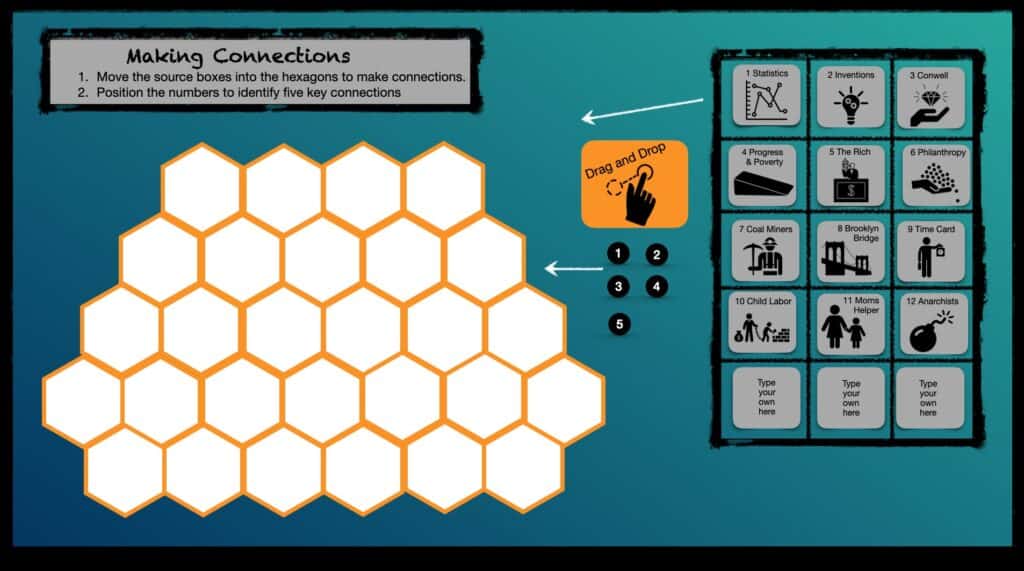
Hexagonal Thinking Corroboration Tool – Keynote will be shared with students.

After our review of the 19th century documents, we will consider the same essential question in the context of contemporary America.


Assignment 6 | Lesson Pitch 20-A6

This assignment will begin our preparation for lesson to be delivered in a future class after break.

To get some peer feedback before you get into detailed planning, this coming week you should prepare both a post and a brief pitch presentation that outlines your initial ideas for the activity. Hopefully we will give you good feedback that will make your lesson better.

Your post is the more SPECIFIC part of your pitch. If you were selling me a car – this would be the techs specs. It should include:
  1. good title and featured image
  2. target audience and setting – what class and how might this be used?
  3. content – what will be studied? Why is it interesting or important?
  4. process – what will you do – what will students do?
  5. resources for lessons – what do you plan to provide the students?
  6. Delivery considerations – how do you plan to deliver this remotely?
Your presentation is the FUN part of pitch. If you were selling me a car, this would be the test drive where you are pitching me on how cool it would be to own it.
  1. it does not need to include every part of the written post.
  2. it should be more visual than text based.
  3. it’s the big idea of your lesson – why do you want to teach this lesson, why is it interesting to you?
  4. what’s the essence of what students will be doing.
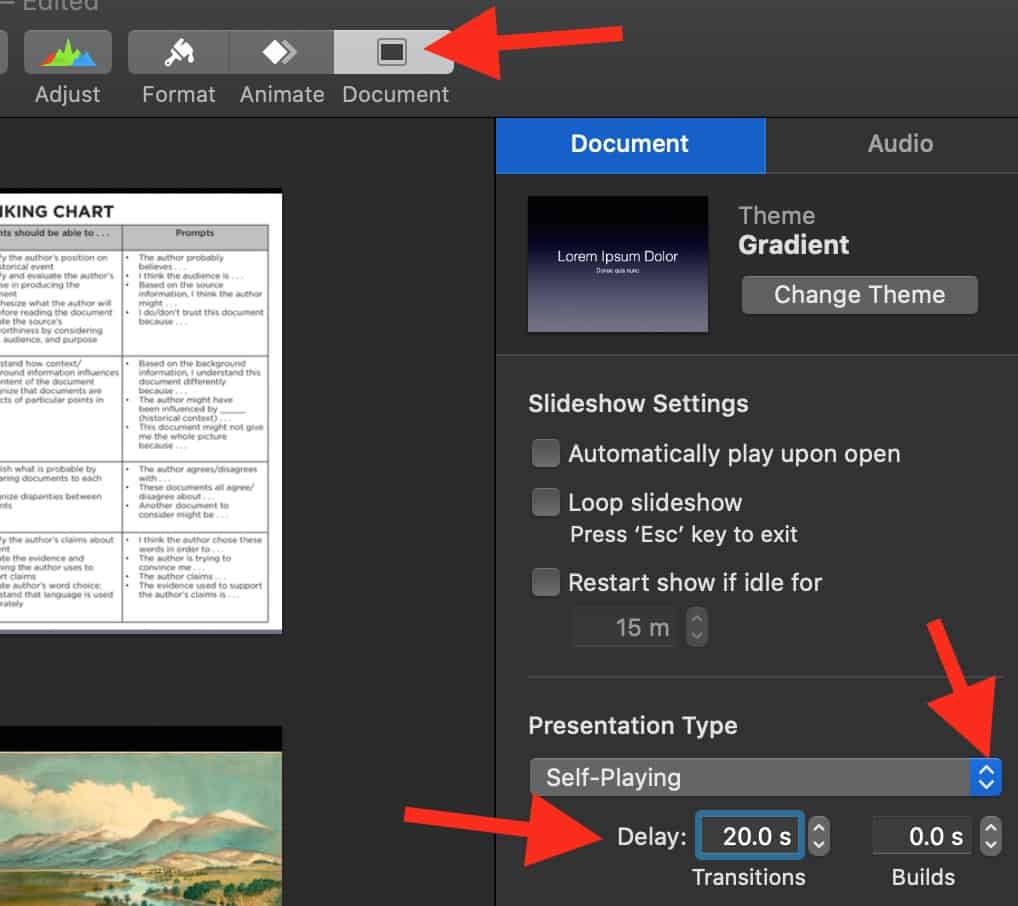
  5. it should be delivered “Pecha Kucha” style and consist of maximum of 20 slides. Each one timed to automatically advance at 20 seconds. You should aiming to “talk less, show more.” You will need to rehearse your delivery to match the slide timing. So your presentation will last no longer than 400 seconds. (6 minutes / 40 seconds)

Resources

If you want to plan long range – our presentation calendar looks like this

Oct 5: Pitch your idea – presentation and post
Oct 19: Your formal post sharing your finished teaching activity (some activities will be delivered)
Oct 26 and Nov 11: Remaining activities delivered

How to set up a Apple Keynote presentation so it auto advances every 20 seconds
Class 5: Looking Back – Was Lincoln a Racist?

Featured image: Freedmans Monument in Lincoln Park Lincoln Park (1876)
Sculptor: Thomas Ball Source

Overview

We will continue our examination of historical thinking skills based on the work by Stanford History Education Group. (SHEG). In this class our focus will be on Contextualization. See Historical Thinking Chart  (pdf in English and Spanish at SHEG).

For content, in this class session will will consider the roots of American racism seen through the lens of US Civil War era.


Class Session | Zoom Video

We will open class with a check for understanding activity focused on the historical sourcing. Next, Peter will lead a short demonstration of contextualization.

Then the class will break into two groups to explore racism in context in two using the framework of “Structured Academic Controversy”  (SAC). Not all issues can be easily debated as pro / con positions. SAC provides students with a framework for addressing complex issues in a productive manner that builds their skills in reading, analyzing, listening, and discussion. It shifts the goal from “winning” the argument to active listening to opposing viewpoints and distilling areas of agreement.

SAC questions

Question A:  Was Abraham Lincoln a racist? 250kb PDF. 
Breakout 1 argues that Lincoln was a racist.
Breakout 2 argues that Lincoln was not a racist.

Question B: Were African Americans free during Reconstruction? 750kb PDF. 
Breakout 3 argues African Americans were free during Reconstruction.
Breakout 4 argues African Americans were not free during Reconstruction.

Format

Position Presentation
1. Side A presents their position using supporting evidence from the texts.
2. Side B restates to Side A’s satisfaction.
3. Side B presents their position using supporting evidence from the texts.
4. Side A restates to Side B’s satisfaction.
Consensus-Building
5. Abandon roles.
6. Build consensus regarding the question (or at least clarify where your differences lie), using supporting evidence.
7. Consider the question: How should we judge people from the past?


Assignment 5 | Graded Forms 20-A5

ASSIGNED reading:

In our next class we will be exploring the impact of industrialization in the late 1800s. Please download and review Progress and Poverty in Industrial America available free at iTunes. We will be using the 11 sources to create a graphic organizer that responds to the essential question: “How do we evaluate the social costs and benefits of technological innovations?”

ASSIGNED ACTIVITY:

We will build on our new Google Forms skills by designing two separate forms – a self graded quiz and differentiated form. The self-graded quiz is scored tests, so you should find some historical source material that lends itself to objective questions. The differentiated form could also be an objective test or a “choose your own path” presentation. (See Resources below)

Each Google form  should include:

  1. Title
  2. Historical document(s) as prompt for questions.
  3. Where you got the document(s). Include working URL. (Be sure it’s in public domain)
  4. About 3 – 5 questions for user to answer. 
  5. Answer key that gives feedback for correct / incorrect answers. (In your self-graded quiz)
  6. Alternative paths to different sections based on answers (In your differentiated form)

Embed the two Google forms in post (more instructions below). 

Be sure your blog post has: 

  1. Featured image and clever title
  2. Target student group. Grade, course.
  3. Quiz context – for example – introduction, pre-assessment, etc
  4. Direct link to Google Forms
  5. Embedded Google Forms using HTML Snippets (same process as last class)

Resources

Self grading form – students will see how they did on each question. And you can provide feedback and “reteaching” for questions they missed.

Sample Self Graded Quiz Link
How to make Self Graded Quiz Link

Differentiated form – it is self graded, except if as they get correct or wrong answers they follow different paths. For example if they miss question 1, they go to instructional info and then retake the question. If they get question 1 correct, they go directly to question 2.

Sample differentiated quiz Link
Here’s one that adds images Link
Can use the same technique to make it a “choose your own path” Link
Here’s a good planning tool for “choose your own path” Link

Here’s a good how to on created a differentiated form

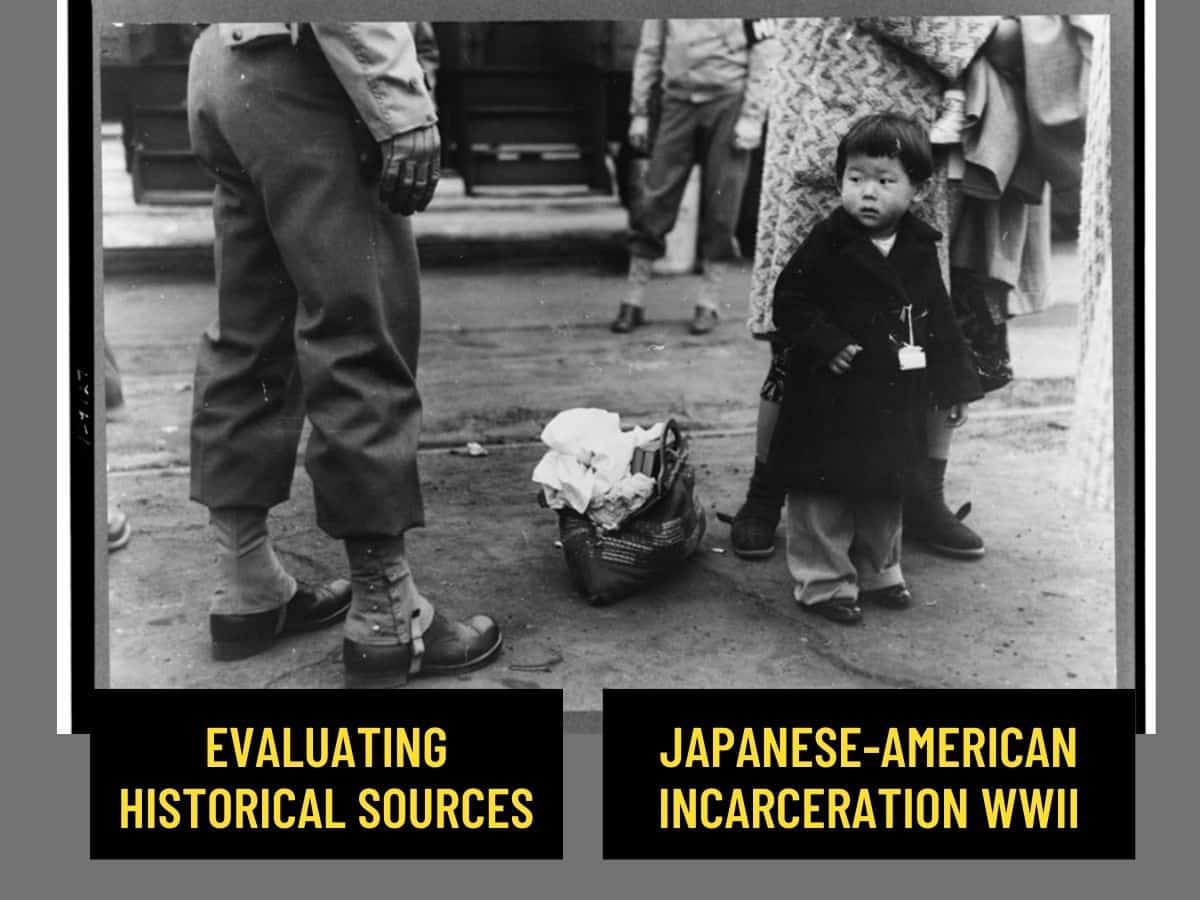
Class 4: Evaluating Historical Sources – Japanese-American Incarceration WWII

Evaluating Historical Sources - Japanese-American Incarceration WWII

Featured image source

Overview

This class will begin a multi-class examination of historical thinking skills based on the work by Stanford History Education Group. (SHEG). We will focus on four key historical thinking skills – Sourcing, Contextualization, Corroboration and Close Reading. See Historical Thinking Chart  (pdf in English and Spanish at SHEG).

For content, in this class session we will examine the WWII incarceration of Japanese Americans.


Class Session | Zoom Video

Class will open with some introductory activities both evaluating the work from last week’s class and the assigned flipped lesson Who is the historian in your classroom? Created at TEDed.

We will have an initial review of the topic using the multitouch iBook,  Portland’s Japantown Revealed (free at iTunes). Students will then use a modification of this evaluation guide to compare the two videos below.

How does the video say it?

  • Who made these videos and what was their purpose in making the videos?
  • What was the essential message of each video? What makes you think that?
  • What audio and visual elements are used to support the message of the video? Cite specifics.
  • How effective are these videos in communicating their message?

How does the video connect to me?

  • How is each video a product of its time? Do the videos rely on fact or opinion? Do they appeal to the viewer’s reason or emotion? Cite specifics
  • How do these videos communicate in ways that would differ from a textbook?
  • What is my reaction to the videos and the treatment of Japanese Americans during World War II?
  • How might others see these videos in different ways than me?

From the Uprooted Project

Essential question: How does a nation balance national security and the rights of the individual?

In class discussion using a Fishbowl model

Assignment 4 | G Form lessons 20-A4

Design a Sourcing lesson using a Google Form and embed into your next post. 
Start a Google Form here

Google form sourcing lesson should include:

  1. Title
  2. At least two documents to be considered – could include images, videos, or short text passages)
  3. Archival sources of documents (be sure it’s in public domain)
  4. At least 3 questions for user to answer. Could be separate questions for each documents or collective questions for both.
  5. Instructional goal that highlights the expected answers and / or student insights.

Embed the Google form in post (more instructions below). 

Be sure your blog post has: 

  1. Featured image and clever title
  2. Target student group. Grade, course.
  3. Lesson context – for example – introduction, pre-assessment, part of bigger unit, etc
  4. Lesson delivery in virtual classroom – for example – flipped instruction, in class station, etc.
  5. How the Google Form will be used to help achieve instructional intent.
  6. Embedded Google Form using HTML Snippets (instructions below)
  7. Direct link to Google Form

Resources

Student work from fall 2019

Support for using Google Forms

Sample Google form lesson

Here’s a sample lesson using a Google Form and one document (you’ll need two)

Direct link: Zulu Chief Photograph


tech resources for this lesson

How to get an embed code for your Google form

How to HTML Snippets to embed your Google form into WordPress post. Note in this example I begin by getting the embed code from a Padlet. Once you have the any embed code on your “clipboard” you can use HTML Snippets in WordPress

Class 3: Three Keys to Student Engagement

Three keys to student engagement

Overview

Today’s class will focus on the subject of student engagement. We’ll use a presentation and a few activities to demonstrate how higher order thinking tasks, opportunities for student choice and fostering student reflection can both enhance student engagement and create deeper learning.  

Class Session | Zoom Video

We will open with breakout group discussion of our last posts. Then Peter will do a presentation and demonstration of some thinking skills in action.

Assignment 3 | Image Icebreakers 20-A3

assigned viewing
  1. View this flipped lesson Who is the historian in your classroom? Created at TEDed using a video from Stanford History Education Group. (SHEG)
  2. Download Portland’s Japantown Revealed (free at iTunes). Published by your prof in 2014. You don’t have to read book in detail. Just get some background on Portland’s Japantown and subsequent incarceration of Japanese-Americans in WWII.
  3. Use this STUDENT GUIDE (1mb pdf) to focus your viewing of Uprooted and Japanese Relocation. Focus on looking for the key questions from the student guide:
    – (3) How does the video say it?
    – (4) How does the video connect to me?
  4. View the 10 min video: “Uprooted.” made in 2014 by documentary filmmakers to accompany museum exhibit. It features historic video from World War II as well as oral history interviews with Japanese Americans that the filmmakers shot in 2013 and 2014.
  5. View the 9 min video: “Japanese Relocation (1942).” made in 1942 by the US government as an informational service to the US public. It features video shot in 1941 and 1942 and narration by Milton Eisenhower, director of the War Relocation Authority and (future) President Dwight Eisenhower’s younger brother.
Assigned Activity

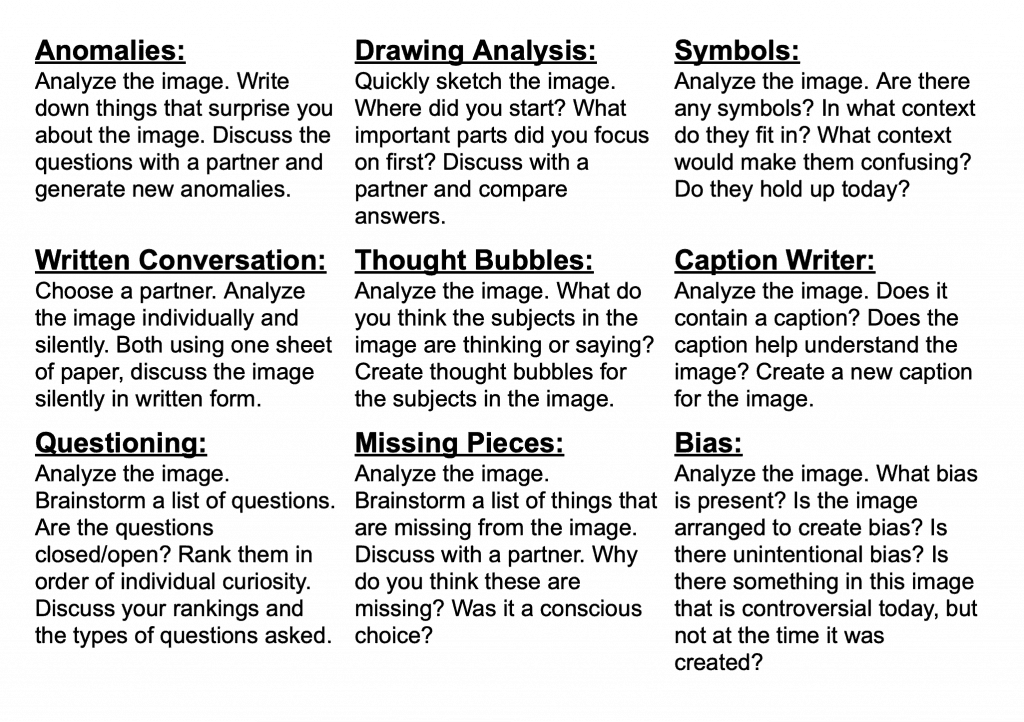
Decide on a broad theme, era or topic and find 3 historical images. For each image use one of the following “Primary Source Icebreakers” as an “inspiration” for a prompt. The post should include:

  1. Interesting title
  2. Featured image
  3. Three images with prompts and responses

For each of the three images include:

  1. Icebreaker used
  2. Image
  3. Source of image as active hyperlink
  4. Any important context for image
  5. Pose specific icebreaker prompt(s) being used
  6. Include an expected student response to prompt that would indicate understanding of source image and prompt
Primary Source Icebreakers
This image has an empty alt attribute; its file name is Primary-Source-Icebreaker-1024x722.png
Source TPS Connect

Resources – Sample post

Note: this models using one image with one icebreaker. Your post should include three of these.

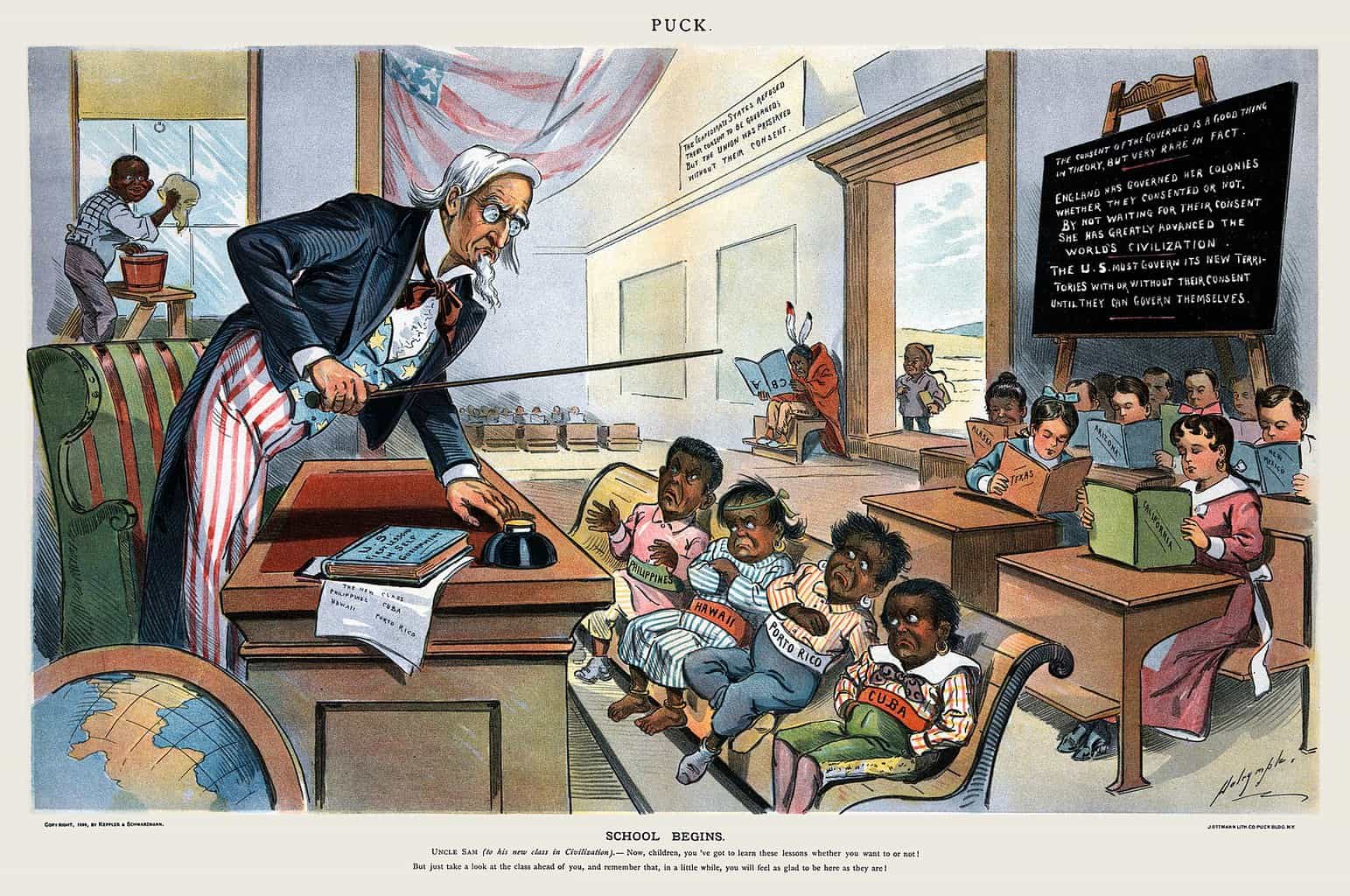
Thought Bubbles
"School Begins" from Puck Magazine January 25, 1899
Source (click to view larger version)

Title: “School Begins” from Puck Magazine January 25, 1899

Context: This cartoon is titled “School Begins.” Caption at bottom states: Uncle Sam (to his new class in Civilization): Now, children, you’ve got to learn these lessons whether you want to or not! But just take a look at the class ahead of you, and remember that, in a little while, you will feel as glad to be here as they are!”

Icebreaker prompt: Create a thought bubble for three characters in the cartoon

Response:
Uncle Sam: “I hope I don’t regret letting these kids into my school!”
Kids in front row: “I don’t like our new teacher.”
Kids reading (note states they are from): “Remember when we were the new kids”


Additional FYI (not part of sample): Puck was the first successful humor magazine in the United States. It was published from 1871 until 1918. In 1881 some of Puck’s artists formed a rival satirical magazine: Judge. It was published until 1947. Both are great sources for political cartoons to use with your students.