Places are locations having distinctive features that give them meaning and character that differs from other locations. Therefore, places are human creations, and people’s lives are grounded in particular places. We come from a place, we live in a place, and we preserve and exhibit fierce pride over places.”
National Geography Standard 4: Place
Overview
In today’s class we will introduce two mapping tools: Google Earth and Google MyMaps. They are easy platforms for teachers and students to create and share interactive maps that can contain additional multi-media content.
Class will also feature lessons taught by: Madi Higgins- Washington, Bruce MacDonald – Political Positions and Lucy Rothwell
Assignment: There is no assignment from this class.
Today’s class will explore interactive images with Google MyMaps and Google Earth. Both apps provide tools for teachers and students to create and share interactive maps that tell a story of place.
Google MyMaps is a great tool for visualizing place with a variety of content and locational tools. You can easily add photos, video, text, routes and shapes. You can collaborate and share your maps via email. It can be easily embedded in WordPress. MyMaps gets saved in your Google Drive account for easy cataloging.
Google Earth is now a web-based tool that can easily create engaging stories maps that tell a story. With creation tools, you can draw on the map, add your photos and videos, customize your view, and share and collaborate with others. You cannot embed in WordPress. Use a screenshot of you map as a hyperlink from your WordPress post to your map project.
This class will kick off a multi week exploration the largely forgotten government policies that segregated nearly every major American city and metro area. We will also look at how those unconstitutional actions have fostered inequality in America since their enactment in the 1930s. In preparation for this class students watched the video Segregated by Design.
We will also feature three student-led lessons taught by Patrick Boldt – Machu Picchu, Chris Morzenti – Moon Landing and Jacob Regge – Chicano Movement.
Class will open with some background on the history of redline maps and will receive instruction on how to work with this week’s archival websites and there will be an introduction to our final project due on Nov 28th.
Students will use the website Mapping Inequality: Redlining in New Deal America and the 1940 US Census to explore how the “redline” maps created by agents of the federal government’s Home Owners’ Loan Corporation (HOLC) between 1935 and 1940 segregated cities all across America.
The focus should be on how the “redline” HOLC categories (best, still desirable, definitely declining and hazardous) are reflected in data from the 1940 census. And how those mortgage regulations shaped the lives of people who lived there.
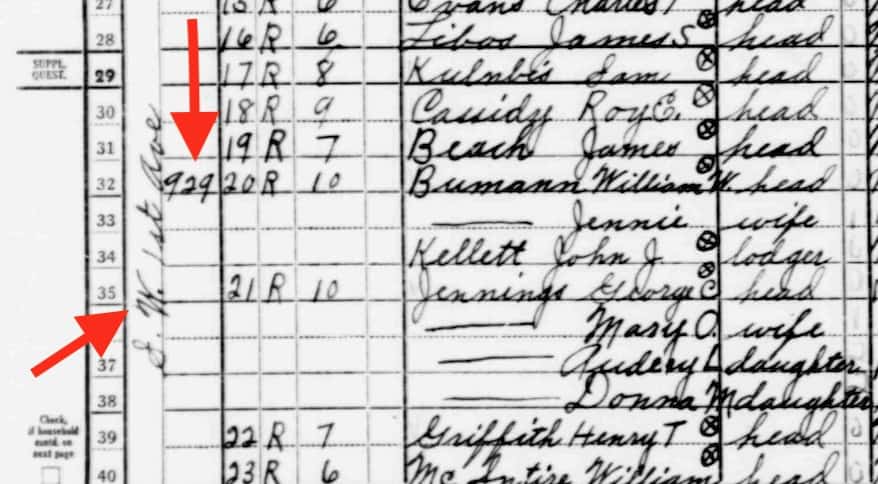
Page from 1940 Census: Portland Oregon SW 1st Ave designated “Hazardous”D8 Southwest River District
Whatever approach you choose, your post should include standard elements – title, featured image, citations / links from public domain content. You may also want to use screen shots from the Mapping Inequality maps or text from the neighborhood descriptions. Or screenshots from the the 1940 census.
This is meant to be a creative exercise – so feel free to explore some options. See Fall 2020 posts here.
You could identify neighborhoods in Mapping Inequality and find the data from the corresponding location in the 1940 census. You may want to choose a neighborhood here in Portland or some other city. It could be one you or a family member has lived in.
You could use the Census information to select a few families on that street to “tell their story” using data from the census – names, family members, housing, income, employment, country of birth. Using currency converters you could represent their home value, rent and income in current dollars.
Take a comparative approach – using information from a “Best” and “Hazardous” defined neighborhoods in the same city.
Assume the role of an actual family in the census and tell their story more narratively in the first person and illustrate with images from the era that represent the setting or examples of their type of employment.
If you had a family member who was in the census of 1940 and lived in a neighborhood identified on a HOLC – you could tell their story or what happened to your family since.
Compare neighborhood designation and some Census data 1940 to what the neighborhood is like today (Data from Zillow or Redfin. Which also sometime show interiors of home.)
Search the 1940 census here. Note it works better in Chrome than Apple Safari.
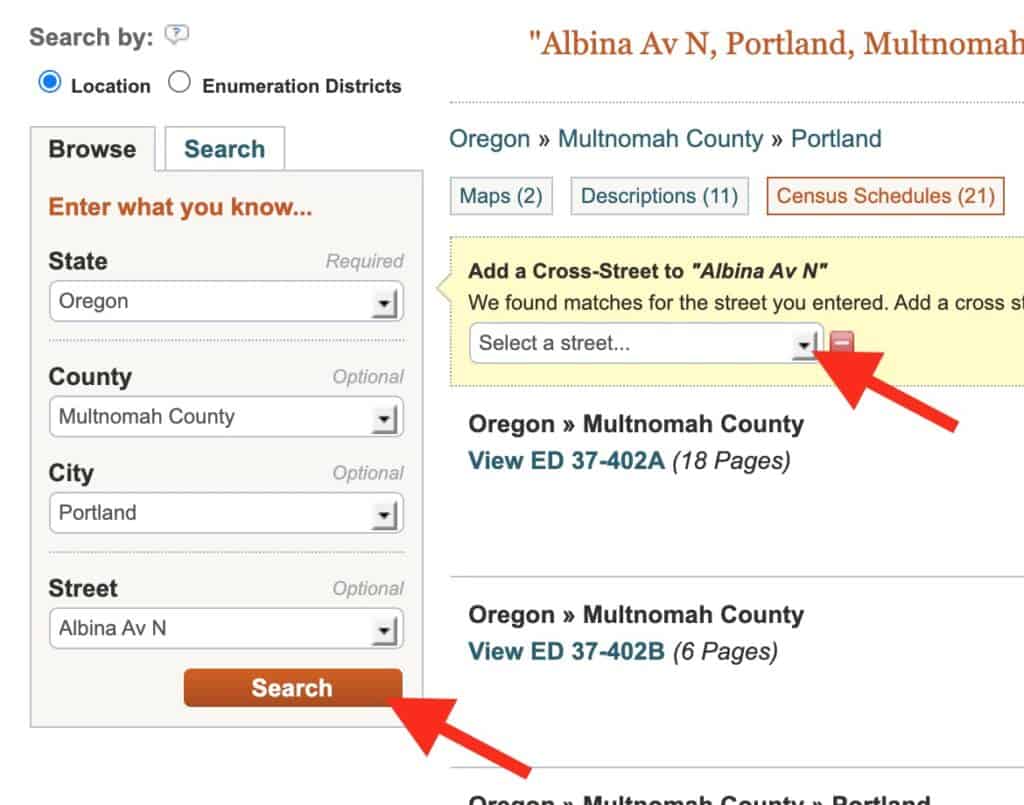
You will “Search by location where the person lived.” Begin by narrow search by state, county, city, street.
After you click search, you have the option to add a cross street.
3. It will take you to multipage document that may not exactly zero in on the intersection you wanted. You may need to scroll through some pages to get to that location. You can find the streets and house numbers on far left.
Street written vertically – SW 1st Ave and house number – 929
History and other humanities that tended to be narrative are leveraging data collection and display tools to spawn a new digital / data approach to teaching history and social science. In today’s class we will explore some of these exciting web resources.
Class Session
Peter will offer an introduction to these sites. Students will be encouraged to consider how they could use these tools to support a lesson.
We will begin our first round of student lesson lessons by: Kyle Boone – Imperialism | Olivia Marovich – Women in PRC | Matt Wheatley – Japanese Culture
There is no “creative” assignment for this class. But students should watch this video in preparation for next week’s class.
“Segregated By Design” examines the forgotten history of how our federal, state and local governments unconstitutionally segregated every major metropolitan area in America through law and policy.
Sample Digital History Tools and Resources
Nation level data sets
GapMinder World – manipulate moving bubble graphs, select x and y axis from a variety of data sets
Rank Country – insightful world maps and country list data visualizations.
Text / Archival tools
NGram Viewer – online research tool that allows you to quickly analyze the frequency of names, words and phrases -and when they appeared in the Google digitized books. For more advanced searches using NGram Viewer click here.
WordSift was created to help teachers manage the demands of vocabulary and academic language in their text materials.
Chronicling America – searchable collection of US newspapers from from 1789-1963.
This class concludes a multi-class examination of historical thinking skills based on the work by Stanford History Education Group. (SHEG). Today we will examine Close Reading the last of our four key historical thinking skills – Sourcing, Contextualization, Corroboration and Close Reading. See Historical Thinking Chart (pdf in English and Spanish at SHEG).
Then students will offer brief pitches with ideas for their demonstration lessons after fall break.
Class Session
Teachers can use historical documents to build literacy skills in a content area while empowering students to be the historian in the classroom. But document-based instruction in this context requires four key elements to be successful:
The right documents. (shouldn’t be reliant on background knowledge)
Knowing how to “read” the historical document.
Letting students discover their own patterns, then asking students to describe, compare and defend what they found.
Basing the task on enduring questions, the kind that students might actually want to answer.
In Class 7 we will practice some strategies for assisting students to more closely read a document (in all their multimedia formats) by answering three questions. Broad version:
What does it say?
How does it say it?
What’s it mean to me?
More specifically, what do we mean by close reading? Teachers can guide students with scaffolding questions that explore “texts” (in all their formats).
Key Ideas and Details:
What does the text say? Identify the key ideas. What claims does the author make? What evidence does the author use to support those claims?
Craft and Structure:
Who created the document? What’s their point of view / purpose? How did the text say it? How does it reflect its historic time period?
Integration of Knowledge and ideas:
Distinguish among fact, opinion, and reasoned judgment in a text. Recognize disparities between multiple accounts. Compare text to other media / genres. How does it connect to what we’re learning?
And what’s it mean to me?
How does the document connect to my life and views? The author is trying to convince me of … I do (or don’t) trust this document because … What historic “voices” are missing?
Students will develop and deliver a 25-30 min lesson in their assigned class. Student should be prepared to deliver the lesson via Zoom in our Oct 18th class.
About the lesson The lesson should teach historical thinking skill(s). Specific content of lesson is up to you.
This lesson should be delivered as if we were your class.
Your peers will serve as participant observers noting lesson content, nature of the student task, lesson delivery and student workflow.
Feel free to design a flipped lesson in advance and let the class know of your plans and required viewing.
If you have a significant amount of reading required, send it to us in advance.
About the post. The lesson should be supported / explained in a post due by Oct 16th.
Think of your audience as another teacher who might want to borrow this lesson. Do they have all the resources and explanation they need?
The post should include:
Interesting title and relevant featured image
Target audience and setting – what class and how might this be used?
Content – what will be studied? Why is it interesting or important?
Process – what will you do – what will students do?
Resources for lessons – what do you plan to provide the students?